


Master Gorgeous UI Design by Pablo Stanley is a comprehensive visual design program created for designers who want to move beyond functional interfaces and learn how to create beautiful, memorable, and professional digital products. Drawing from years of experience at companies like Lyft, InVision, Carbon Health, and Blush, Pablo Stanley shares his complete approach to visual design, helping students develop both strong design fundamentals and a unique creative style.
Unlike traditional UI courses that focus only on software tools, this program teaches the principles behind exceptional interfaces—covering typography, color, hierarchy, layout, visual storytelling, design systems, components, dashboards, landing pages, and personal design expression.
Whether you’re a beginner looking to strengthen your visual design skills or an experienced product designer aiming to elevate your work, this course provides a practical roadmap for creating polished interfaces that stand out.
What You’ll Learn
Inside Master Gorgeous UI Design, you’ll learn how to:
- Master professional UI design principles
- Develop stronger visual hierarchy
- Create beautiful typography systems
- Use color strategically in interfaces
- Design modern layouts and compositions
- Build effective UI components
- Create dashboards and product interfaces
- Design landing pages that convert
- Improve accessibility and usability
- Develop your own visual style and design voice
- Create more engaging user experiences
- Present design work with confidence
What’s Included
This course includes:
- UI Design Foundations
- Typography Masterclass
- Color Theory for Digital Products
- Layout & Composition Training
- UI Components Library
- Dashboard Design Workshops
- Landing Page Design Frameworks
- Real Design Practice Sessions
- Community Access
- Weekly Workshops
- Portfolio Reviews
- Resource Library
- Lifetime Access
Complete Course Curriculum
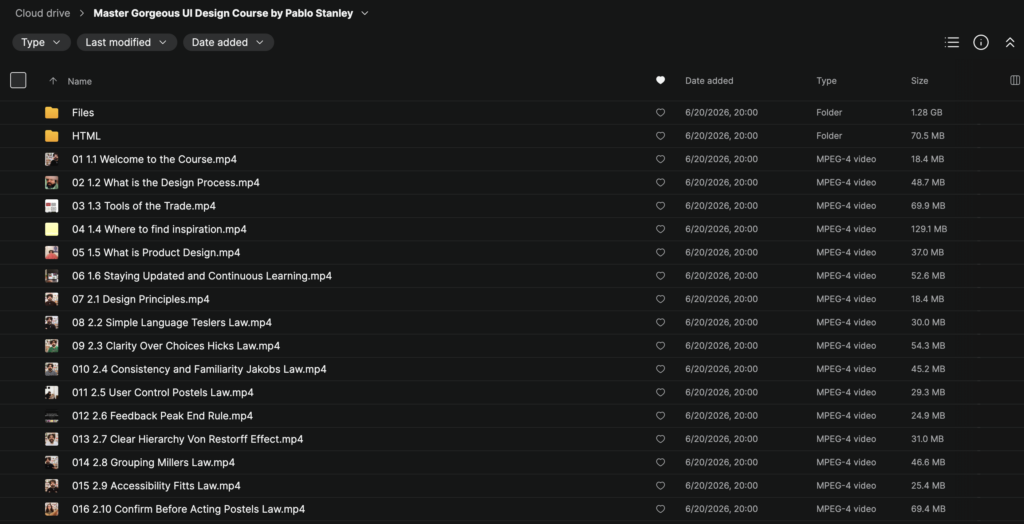
Module 1: Foundations of UI Design
Build a strong understanding of modern digital product design.
Lessons include:
- Welcome to the Course
- What is the Design Process?
- Tools of the Trade
- Where to Find Inspiration
- What is Product Design?
- Staying Updated and Continuous Learning
Learn the mindset and workflow used by professional designers.
Module 2: Design Principles
Master the psychological principles that make interfaces intuitive.
Topics include:
Design Principles
Core visual communication concepts.
Tesler’s Law
Simplifying complexity for users.
Hick’s Law
Reducing decision fatigue through clarity.
Jakob’s Law
Leveraging familiar design patterns.
Postel’s Law
Designing flexible user experiences.
Peak-End Rule
Creating memorable experiences.
Von Restorff Effect
Using emphasis effectively.
Miller’s Law
Managing information load.
Fitts’s Law
Improving accessibility and interaction design.
Confirm Before Action
Reducing user errors through confirmation patterns.
Includes practical design exercises and live demonstrations.
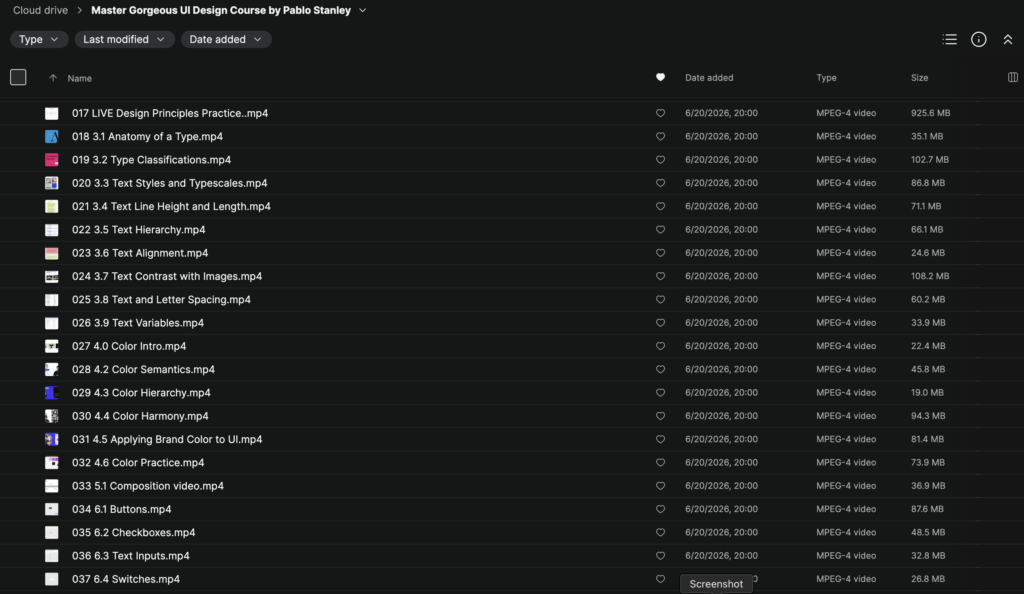
Module 3: Typography Mastery
Learn how typography shapes user experiences.
Topics include:
- Anatomy of Type
- Typeface Classifications
- Text Styles & Type Scales
- Line Height & Text Length
- Typography Hierarchy
- Text Alignment
- Text Contrast with Images
- Letter Spacing
- Text Variables
You’ll learn how to create professional typography systems that improve readability and aesthetics.
Module 4: Color Systems
Develop confidence using color in product design.
Topics include:
Color Fundamentals
Understanding color relationships and usage.
Color Semantics
Using color to communicate meaning.
Color Hierarchy
Guiding attention through color.
Color Harmony
Building visually pleasing palettes.
Applying Brand Colors
Creating scalable product experiences.
Color Practice
Hands-on exercises to reinforce concepts.
Module 5: Layout & Composition
Learn how to structure interfaces effectively.
Topics include:
- Composition Fundamentals
- Visual Balance
- Alignment Systems
- Grid Structures
- Spatial Relationships
- Content Organization
These lessons help create cleaner and more professional interfaces.
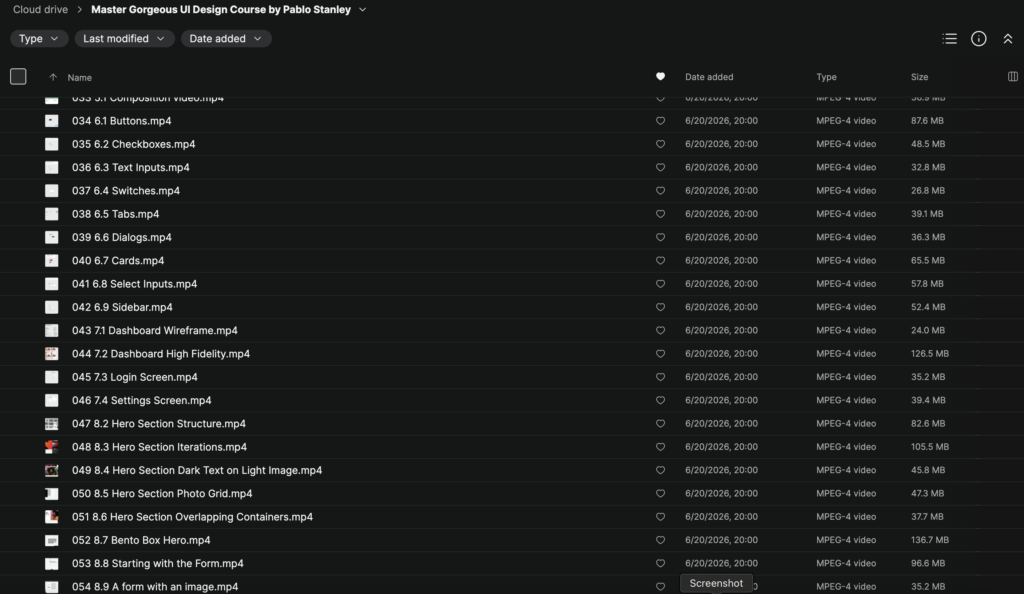
Module 6: UI Components
Master the building blocks of modern digital products.
Topics include:
Buttons
Designing effective calls to action.
Checkboxes
Interaction and usability principles.
Text Inputs
Creating user-friendly forms.
Switches
Modern toggle interactions.
Tabs
Content organization techniques.
Dialogs
Modal design best practices.
Cards
Flexible content containers.
Select Inputs
Dropdown and selection experiences.
Sidebars
Navigation and information architecture.
Module 7: Dashboard Design
Apply your skills to real-world product interfaces.
Projects include:
Dashboard Wireframe
Planning interface structure.
High-Fidelity Dashboard Design
Transforming wireframes into polished products.
Login Screen Design
Creating effective authentication experiences.
Settings Screen Design
Designing complex interface systems.
Module 8: Landing Pages & Hero Sections
Learn how to create compelling marketing experiences.
Topics include:
Hero Section Structure
Building strong first impressions.
Hero Iterations
Exploring design variations.
Dark Text on Light Images
Improving readability.
Photo Grid Layouts
Creating engaging visual compositions.
Overlapping Containers
Modern visual techniques.
Bento Box Hero Design
Contemporary landing page layouts.
Form-Based Hero Sections
Lead generation design patterns.
Image-Based Forms
Combining visuals with conversion-focused design.
Module 9: Adding Style & Visual Voice
Move beyond templates and develop your own creative identity.
You’ll learn how to:
- Build a recognizable design style
- Create unique visual systems
- Differentiate your work from competitors
- Develop stronger creative confidence
- Improve portfolio quality
Module 10: Professional Growth
Learn how to thrive as a modern designer.
Topics include:
- Career development
- Portfolio improvement
- Design communication
- Client collaboration
- Continuous learning
- Industry best practices
Community & Bonuses
Students also receive access to:
- Design Community
- Discord Channels
- Portfolio Showcase Reviews
- Weekly Live Workshops
- Guest Speaker Sessions
- Design Resource Library
- Together Studio Templates
- Future Course Updates
What Makes This Course Different
Many UI courses teach software.
Master Gorgeous UI Design teaches:
Design Principles → Typography → Color → Layout → Components → Products → Visual Style
This approach helps designers understand why great interfaces work, not just how to build them.
Key Benefits
- ✅ Improve visual design skills
- ✅ Master typography and hierarchy
- ✅ Build stronger UI systems
- ✅ Learn modern component design
- ✅ Create better dashboards and landing pages
- ✅ Develop a unique design style
- ✅ Access community support
- ✅ Receive lifetime updates
- ✅ Improve portfolio quality
- ✅ Learn directly from Pablo Stanley and team
Who This Course Is For
This course is ideal for:
- UI Designers
- UX Designers
- Product Designers
- Web Designers
- Front-End Developers
- Freelancers
- Creative Professionals
- Design Students
- Startup Founders
- Anyone interested in digital product design
About Pablo Stanley
Pablo Stanley is a designer, entrepreneur, educator, and creator known for his work at Lyft, InVision, Carbon Health, Blush Design, and numerous open-source design projects. He is widely recognized for helping designers combine strong visual design principles with practical product thinking while encouraging creativity and individual expression.
Final Thoughts
Master Gorgeous UI Design Course by Pablo Stanley is a complete visual design education program that teaches both the technical foundations and creative principles behind exceptional user interfaces. From typography and color systems to dashboard design, landing pages, and personal design style, this course provides a structured path for designers who want to create work that is both functional and visually remarkable.
Get Pablo Stanley – Master Gorgeous UI Design today.